Guide:LEGO Loco Easter eggs: Difference between revisions
| Line 37: | Line 37: | ||
=== Date-based === | === Date-based === | ||
[[File:LOCO skeletons on Halloween.png|thumb|During Halloween, all minifigures become [[skeleton]]s]] | |||
These Easter eggs are triggered by launching ''LEGO Loco'' on specific days.<ref name="eeggs dates"/> | These Easter eggs are triggered by launching ''LEGO Loco'' on specific days.<ref name="eeggs dates"/> | ||
* Easter: 1 April − 14 April. Five scenery items are unlocked, worlds start with the "Green" background upon starting the game, and the Toybox and zoombox handles change to a striped appearance. | * [[Wikipedia:Easter|Easter]]: 1 April − 14 April. Five scenery items are unlocked, worlds start with the "Green" background upon starting the game, and the Toybox and zoombox handles change to a striped appearance. | ||
* Desert: 11 June − 11 July. Thirteen scenery items are unlocked and worlds start with the "Arid" background upon starting the game. | * Desert: 11 June − 11 July. Thirteen scenery items are unlocked and worlds start with the "Arid" background upon starting the game. | ||
* Halloween: 30 October − 1 November. Ten scenery items (including one Christmas item) and one road piece are unlocked, worlds start with the "Backhall" background upon starting the game, the Toybox andzoombox handles change to a bone and play spooky music when moused over, and all minifigures permanently turn into skeletons. | * [[Wikipedia:Halloween|Halloween]]: 30 October − 1 November. Ten scenery items (including one Christmas item) and one road piece are unlocked, worlds start with the "Backhall" background upon starting the game, the Toybox andzoombox handles change to a bone and play spooky music when moused over, and all minifigures permanently turn into [[skeleton]]s.{{efn|Upon saving and reloading after Halloween, the minifigures that were turned into skeletons will not change back, though new minifigures will not be affected.}} On 31 October specifically, all trains are turned into [[Wikipedia:Ghost train|ghost trains]].<ref name="Mania 1999-03"/> | ||
* Winter: 1 December − 31 December. Eleven scenery items and six road pieces are unlocked, house 7 will turn into an igloo house (not permanently unlocked), and worlds start with the "Winter" background upon starting the game. | * Winter: 1 December − 31 December. Eleven scenery items and six road pieces are unlocked, house 7 will turn into an igloo house (not permanently unlocked), and worlds start with the "Winter" background upon starting the game. | ||
* Christmas: 24 December − 30 December. Five scenery items are unlocked and the Toybox and zoombox handles change to have holly and play music when moused over. | * [[Wikipedia:Christmas|Christmas]]: 24 December − 30 December. Five scenery items are unlocked and the Toybox and zoombox handles change to have holly and play music when moused over. | ||
<gallery mode=packed heights=200px> | |||
LOCO easter scenery and zoombox.png | Easter scenery in early April | |||
LOCO desert scenery setup.png | Desert scenery during June and July | |||
LOCO winter and Christmas town and zoombox.png | Winter and Christmas scenery during December | |||
</gallery> | |||
=== Removed Easter eggs === | === Removed Easter eggs === | ||
Revision as of 01:17, 30 January 2026

This guide for the 1998 video game LEGO Loco lists all known Easter eggs in the game and explains how to find them.
List of Easter eggs
Placement-based

These Easter eggs are triggered by placing certain tracks, buildings, and scenery objects in specific positions relative to each other. If placed correctly, the objects will interact with each other once the Toybox is closed, either merging to create a new object or triggering a change in one of the objects.[a]
- Placing four road corner pieces in a circular formation causes them to fuse into an "island" with a palm tree in the centre.[1]
- Placing two red houses with yellow roofs next to each other causes them to fuse into a large red house.[1]
- Placing a radar station to the right side of the Intelligent Games office building causes the office building to turn into a giant robot.
- Placing two radar stations directly next to each other causes them to fuse and turn into a launch pad with a space shuttle.[2] Once at least one launch pad exists in the world, flying saucers will start to appear randomly.[1]
- Placing sunflowers around the entire perimeter of a lake causes the Loch Ness Monster to appear in it.[2][3] It will eventually hide in the lake again, but will reappear after each time the Toybox is closed.
- Placing four fountains into a square formation causes them to fuse into a large fountain; a rainbow appears out of the large fountain when this happens.[1] The large fountain unlocks in the Toybox after this, but placing it from the Toybox will not create a rainbow.
- Placing a dinosaur statue on the left side of a Paint Shop will turn it red.[1]
- Placing a dinosaur statue in between two Paint Shops will turn it blue.[1]
Visit-based

These Easter eggs are triggered by minifigures and animals visiting a building or scenery object. This can happen naturally when they travel to a specific location, or can be forced by the player moving residents to the desired location. A visit seems to count as someone being on or within one tile of the object. Once a visit-based Easter egg has been triggered, a chime sound (usually) plays and the game attempts to focus on the object or minifigure affected by the Easter egg.
- Disco club: After 5 visits, the building's front doors open, the roof shakes, and the two lights on the roof begin flashing colours. After the initial animation, the doors remain open, and clicking on the building will cause the lights and roof to animate again. Music can be heard constantly playing from the building, and will only stop if the building is erased.[4]
- Launch pad: After 100 visits[b], a countdown timer starts on the launch pad; when it reaches zero, the space shuttle launches towards the top of the screen.[1][5]
- Obelisk: After 10 visits, the obelisk will briefly spin rapidly.[1]
- Dinosaur statue: After 15 visits, the dinosaur will look around and roar.[1] This does not appear to work with red or blue ones, although the code to trigger it is present in their files.[6]
- Volcano: After 60 visits, an eruption occurs, causing lava to pour down the sides of the volcano before cooling and hardening.[1] After the initial animation, the volcano will remain in its post-eruption state; despite its appearance, this Easter egg can trigger multiple times.
- Large fountain: After 120 visits, the water in the fountain temporarily drains to reveal gold shining at the bottom, and another rainbow appears over the fountain.[1]
While most of these Easter eggs happen after any residents visit a location a certain amount of times, the Station Master minifigure has unique interactions with a few objects:
- A Station Master near a telephone booth may turn into a Super Station Master.
- Station Masters may water nearby sunflowers, causing them to bloom and grow. Sunflowers placed near a train station that a Station Master is inside of will also grow. This seems to spam notifications for some reason.
Date-based

These Easter eggs are triggered by launching LEGO Loco on specific days.[7]
- Easter: 1 April − 14 April. Five scenery items are unlocked, worlds start with the "Green" background upon starting the game, and the Toybox and zoombox handles change to a striped appearance.
- Desert: 11 June − 11 July. Thirteen scenery items are unlocked and worlds start with the "Arid" background upon starting the game.
- Halloween: 30 October − 1 November. Ten scenery items (including one Christmas item) and one road piece are unlocked, worlds start with the "Backhall" background upon starting the game, the Toybox andzoombox handles change to a bone and play spooky music when moused over, and all minifigures permanently turn into skeletons.[c] On 31 October specifically, all trains are turned into ghost trains.[2]
- Winter: 1 December − 31 December. Eleven scenery items and six road pieces are unlocked, house 7 will turn into an igloo house (not permanently unlocked), and worlds start with the "Winter" background upon starting the game.
- Christmas: 24 December − 30 December. Five scenery items are unlocked and the Toybox and zoombox handles change to have holly and play music when moused over.
-
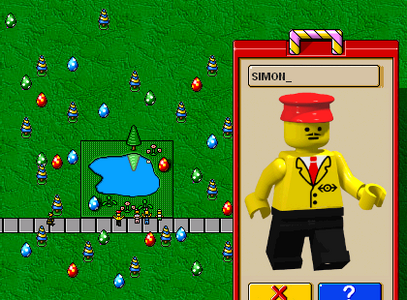 Easter scenery in early April
 -
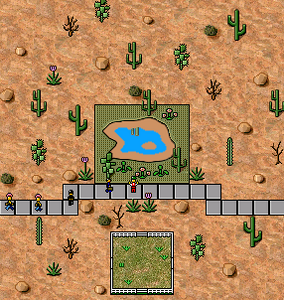 Desert scenery during June and July
 -
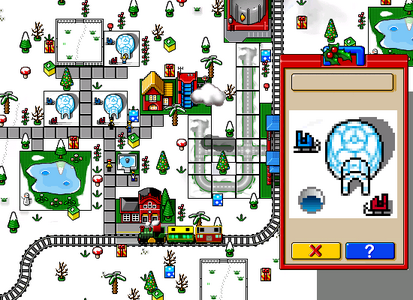 Winter and Christmas scenery during December


Removed Easter eggs


The Viking statue was planned to have an Easter egg where it mooned the player; while the graphics still exist in the game's files, it is currently unknown if it can be triggered. The statue's file indicates it was intended to have a visit-based trigger, but the values for it have been removed.[8] Intelligent Games founder Matthew Stibbe said that the "moony" Easter egg was triggered by simply clicking on the statue, and that during a visit by Kjeld Kirk Kristiansen, one of the programmers had demonstrated it for him. Kristiansen "roared with laughter" upon seeing it, but the LEGO Media producers attending with him had a colder reaction, and the sales team demanded its removal.[9][10] (Development team leader Dee Jarvis instead stated that the statue had a temporary animation of it "taking a piss", that it was only intended to be seen by the game's developers, and that its demonstration to Kristiansen had been accidental.) However, Stibbe later claimed that the Easter egg is still in the game, having been kept in due to Kristiansen's approval.[10][11]
An even larger version of the red cottage house exists in the game's files, but appears to be unused.[12]
Notes
- ↑ For some reason, many guides say to "wait a little while" after placing objects for the Easter egg to happen, despite all placement-based secrets happening instantly.
- ↑ LEGO Media Technical Support claimed that only 10 visits are needed.[1]
- ↑ Upon saving and reloading after Halloween, the minifigures that were turned into skeletons will not change back, though new minifigures will not be affected.
References
- ↑ a b c d e f g h i j k l Wolf, Fenrir; Lego Media Technical Support (15 April 1999). "LEGO LOCO Easter Eggs!". Newsgroup: rec.toys.lego. Usenet: [email protected]. Archived from the original on 27 January 2026. Retrieved 27 January 2026 – via Google Groups.
- ↑ a b c "Tips From the Brain". LEGO Software News. LEGO Mania Magazine. No. 27 (US ed.). Enfield, Connecticut: LEGO Systems, Inc. March 1999. p. 19.
- ↑ Intelligent Games (6 November 1998). "Easter Eggs". LEGO LOCO Instruction manual. London: LEGO Media International. p. 34. Serial IB2G-LOC3.
- ↑ Intelligent Games (1998). LEGO Loco. LEGO Media International. File: resource.RFD\building\disco.dat, lines 53−54.
- ↑ Intelligent Games (1998). LEGO Loco. LEGO Media International. File: resource.RFD\building\launcher.dat, lines 66−67.
- ↑ Intelligent Games (1998). LEGO Loco. LEGO Media International. File: resource.RFD\scenery\dinoblue.dat and resource.RFD\scenery\dinored.dat, lines 43−44.
- ↑ "Lego Loco Easter Egg - Special Dates". The Easter Egg Archive. Archived from the original on 18 October 2000. Retrieved 28 January 2026.
- ↑ Intelligent Games (1998). LEGO Loco. LEGO Media International. File: resource.RFD\scenery\statue2.dat, lines 42−50.
- ↑ Stibbe, Matthew (March 2000). "Working with Brands: A Postmortem of Dune 2000 and LEGO Loco". In Yu, Alan (ed.). 2000 Game Developers Conference Proceedings. San Francisco: Miller Freeman Game Group. p. 584.
- ↑ a b Stibbe, Matthew; Jarvis, Dee; et al. (Intelligent Games). "Research Mega Dump". Rock Raiders United (Interview). Interviewed by Brickome. Archived from the original on 24 September 2021.
- ↑ Crecente, Brian; Vincent, Ethan (9 June 2021). "Episode 23 – LEGO Loco: The LEGO Group's Take on SimCity" (PDF). Bits N' Bricks (Podcast). Participants: Suzanne Maddison, Kevin Shrapnell, Rob Smith, and Matthew Stibbe. The LEGO Group. pp. 16–17. Archived (PDF) from the original on 13 February 2024. Retrieved 27 January 2026. Audio version via YouTube.
- ↑ Intelligent Games (1998). LEGO Loco. LEGO Media International. File: resource.RFD\building\house104.bmp and resource.RFD\building\house104.dat.